> ## Documentation Index
> Fetch the complete documentation index at: https://docs.corafone.com/llms.txt
> Use this file to discover all available pages before exploring further.
# Implementation Guide
> Start here to implement Cora with API and webhook integrations.
## Implementation Guide
Use this guide to implement Cora, the AI debt collection platform, with any external solution.
Use it when you want Cora to run AI collections while your external systems remain the source of truth for accounts, payments, and reporting.
## Before you start
Make sure you have:
* A Cora workspace with access to `Settings`
* At least one AI agent configured
* Your account data format ready (CSV columns or API payload format)
* A public webhook endpoint that can accept `POST` requests
* A plan for where payment events and status updates should be stored in your CRM or internal system
## How implementation works
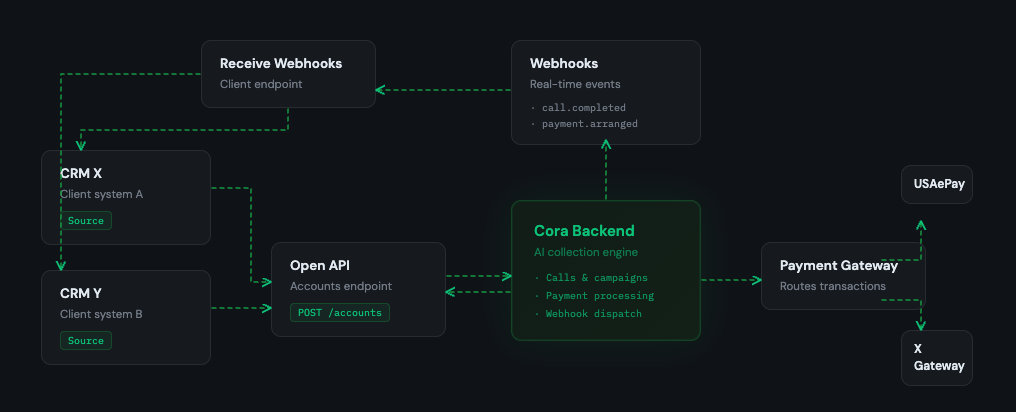
Cora usually sits between your account source and your downstream systems:
1. You import accounts into Cora.
2. Add API keys for your payment processor or CRM.
3. Add webhook endpoints for important events (optional).
4. Run campaigns from Cora, to handle collection calls.
5. Cora sends results (events and payment updates) to your webhook endpoints.
6. Sync your CRM or backend based on those webhook events.
## Diagram
 ## Payments in Cora
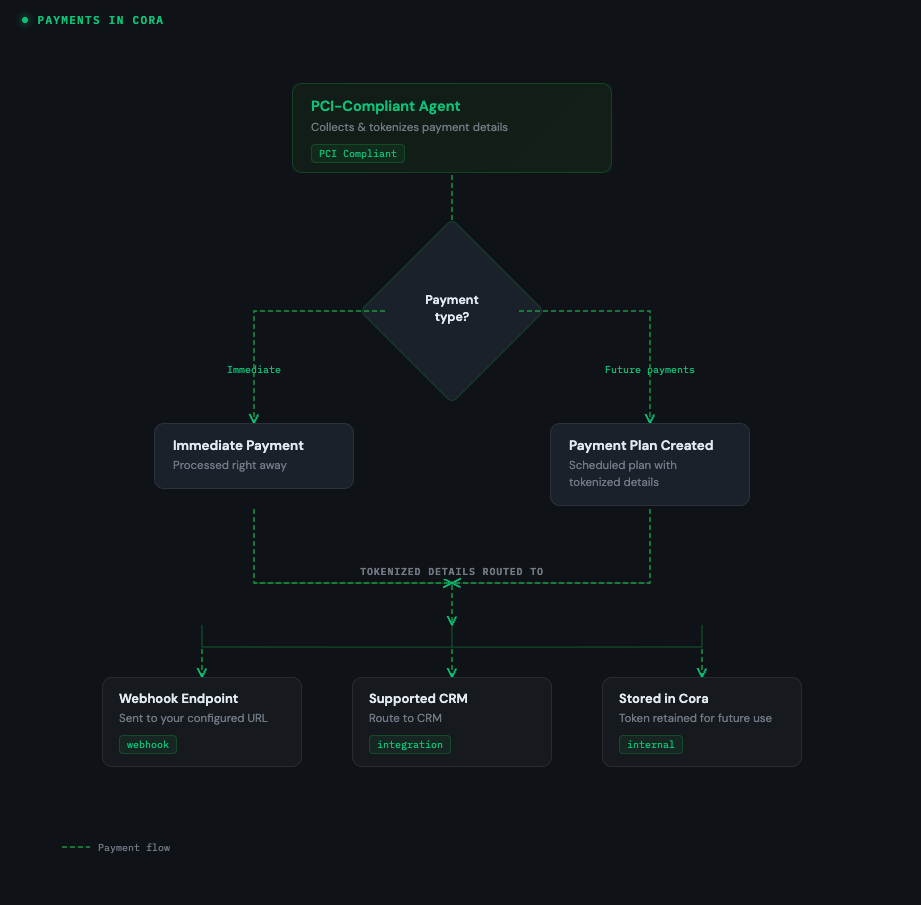
In Cora, payments are usually handled during payment plan negotiation.
A PCI-compliant agent collects and tokenizes payment details, then processes payments through your configured integration.
* If a customer makes an immediate payment, Cora processes it right away.
* If a customer agrees to future payments, Cora creates a payment plan.
* Cora then sends the tokenized payment details required for that plan to your configured webhook endpoint, routes them to a supported CRM, or stores them in Cora.
### Payments diagram
## Payments in Cora
In Cora, payments are usually handled during payment plan negotiation.
A PCI-compliant agent collects and tokenizes payment details, then processes payments through your configured integration.
* If a customer makes an immediate payment, Cora processes it right away.
* If a customer agrees to future payments, Cora creates a payment plan.
* Cora then sends the tokenized payment details required for that plan to your configured webhook endpoint, routes them to a supported CRM, or stores them in Cora.
### Payments diagram
 ## Step details
### 1. Setup Cora
* Configure your organization and agent behavior.
* Confirm your outreach and repayment handling settings.
* Validate that agents are ready before importing live accounts.
### 2. Import accounts
* Use CSV for manual uploads or API.
* Use API for ongoing or automated syncs.
* Keep stable external IDs so updates and reconciliation are reliable.
### 3. Add webhooks
* Register webhook URLs to receive delivery events and payment updates.
* Process webhook events idempotently to avoid duplicate updates.
See [Webhooks](/webhooks) for payloads, signatures, retries, and headers.
### 4. Add API keys and integrations
* Add API keys for your payment processor and CRM integrations in Cora.
## Things to consider
* Account syncing
* It is your responsibility to keep the account synced, with any external events in your system. And map your status to our statuses.
* Receiving webhooks
* To be able to track outcomes, receive payment plans and notifications of payment attempts and keep your account in sync. You need to be able to receive webhooks.
For API behavior and auth details, see [API overview](/) and [Authentication](/authentication).
## Supported
### Payment gateway
* `USAePay`
### CRM
* `SCollect`
* `eCollect`
## Request more
Need support for another payment gateway or CRM. Reach out to request an integration.
[Contact us](mailto:hello@corafone.com)
## Step details
### 1. Setup Cora
* Configure your organization and agent behavior.
* Confirm your outreach and repayment handling settings.
* Validate that agents are ready before importing live accounts.
### 2. Import accounts
* Use CSV for manual uploads or API.
* Use API for ongoing or automated syncs.
* Keep stable external IDs so updates and reconciliation are reliable.
### 3. Add webhooks
* Register webhook URLs to receive delivery events and payment updates.
* Process webhook events idempotently to avoid duplicate updates.
See [Webhooks](/webhooks) for payloads, signatures, retries, and headers.
### 4. Add API keys and integrations
* Add API keys for your payment processor and CRM integrations in Cora.
## Things to consider
* Account syncing
* It is your responsibility to keep the account synced, with any external events in your system. And map your status to our statuses.
* Receiving webhooks
* To be able to track outcomes, receive payment plans and notifications of payment attempts and keep your account in sync. You need to be able to receive webhooks.
For API behavior and auth details, see [API overview](/) and [Authentication](/authentication).
## Supported
### Payment gateway
* `USAePay`
### CRM
* `SCollect`
* `eCollect`
## Request more
Need support for another payment gateway or CRM. Reach out to request an integration.
[Contact us](mailto:hello@corafone.com)